
Free plumbing price book template (Excel, CSV and PDF)
This free plumbing price book template is an Excel workbook with 40 common jobs in 8 categories, plus a CSV of the job list and a one-page printable PDF. Put in your labor rate, trip charge and rounding once, set a markup on each job, and the prices fill in. No email needed.
- Download the Excel template (.xlsx)
- Download the CSV (opens in Google Sheets)
- Download the printable PDF
What’s inside the plumbing price list template
The plumbing price list template is a five-tab Excel workbook, and each tab does one job.
| Tab | What it does | What you do |
|---|---|---|
| Start here | Explains how the file works | Read it once |
| Rates | Holds your labor rate, break-even cost, trip charge and rounding | Enter each number one time |
| Price book | Lists 40 jobs and fills in each price | Replace the hours, check the parts |
| Printable menu | Sets your prices out for paper | Print it for the truck or the counter |
| Reprice | Previews new prices at a % parts increase you set | Copy the new parts costs into Price book when your supply house raises prices |
The 40 jobs sit in 8 categories: Service calls, Drains, Toilets, Faucets and fixtures, Water heaters, Water lines and valves, Disposals, and Sump and outdoor.
The hours in the file are only example starting points. No working plumber has checked them yet, so swap in your own job history before you quote from the book.
Forty jobs is only a start. Aptora’s blog says about 100 core tasks cover roughly 80% of the work, so expect to add rows. If you want the background first, read what a plumbing price book is and what goes in one.
How to fill in the flat rate pricing template
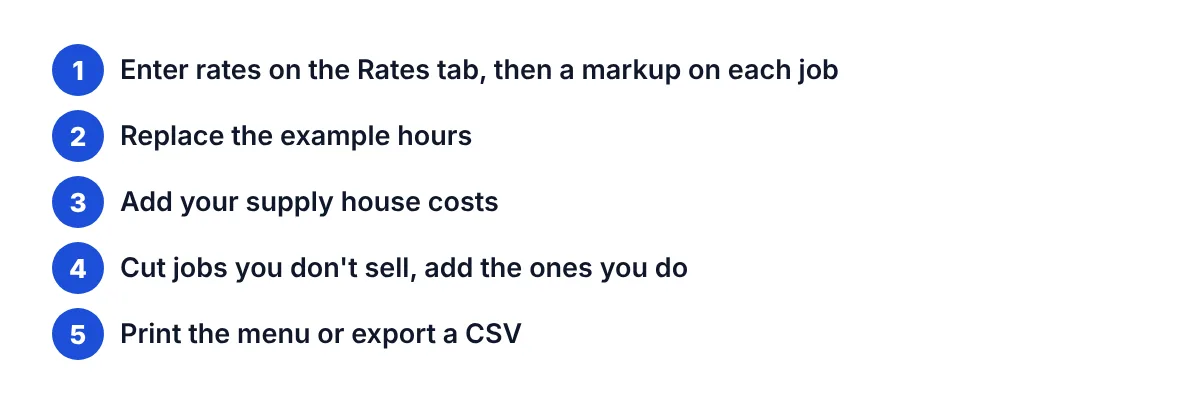
All five steps below happen in the Excel file, so open it up and take them in order.
Step 1: Enter your numbers on the Rates tab
Type your labor rate, break-even cost, trip charge and rounding amount. Don’t guess at the labor rate, because every price in the book hangs on it. The plumber labor rate calculator works it out from wages, burden, billable hours and overhead. Parts markup is set per job on the Price book tab, and the plumbing markup calculator shows what a given markup does to your margin.
Step 2: Replace the example hours
Work down the Price book tab one job at a time. Go by your invoices, your dispatch records or a stopwatch on the next few calls. If you’ve never timed your jobs, start with the price book build guide.
Step 3: Put in your supply house costs
Check the parts cost on each row against what you actually pay at the counter. Don’t forget the small stuff that goes with the job, like a flex connector, a wax ring or an angle stop you’d usually swap while you’re there.
Step 4: Cut and add jobs
If you don’t sell a job, delete it. To add one you do sell, copy a full row so the price formula comes along with it.
Step 5: Print or export
Print the Printable menu tab if your techs work from paper. Save a CSV if you want the prices in your field service software. The import section below covers that.
Worked example: a water heater replacement
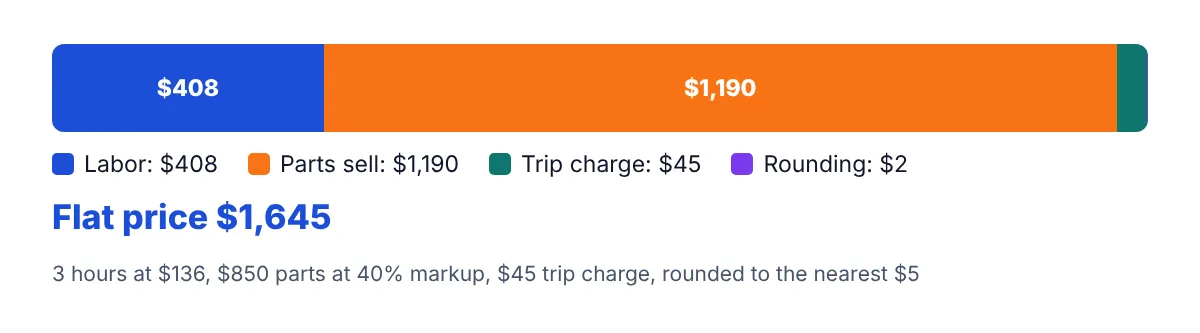
A 40-gallon gas water heater replacement comes to $1,645 in the example shop, using these inputs (example shop, made-up numbers):
- Rates tab: labor $136 an hour, break-even $115.82, $45 trip charge, round to the nearest $5
- Price book tab: markup set job by job, 40% on this water heater
- Price book row: 3.0 hours, $850 parts cost
- Labor: 3.0 x $136 = $408
- Parts: $850 x 1.40 = $1,190
- Trip charge: $45
- Raw total: $408 + $1,190 + $45 = $1,643
- Flat price: $1,645 after rounding
Plumber flat rate price book example
A finished price book shows one fixed price per job, and this example uses the same shop. The numbers are made up, so don’t read them as market rates. Margin here is what’s left after labor, overhead and parts, using the shop’s $115.82 break-even rate.
| Job | Hours | Parts cost | Markup | Flat price | Margin |
|---|---|---|---|---|---|
| Toilet fill valve replacement | 0.75 | $18 | 100% | $185 | 43% |
| Drain clearing, single fixture | 1.0 | $0 | 0% | $180 | 36% |
| Bathroom faucet replacement | 1.5 | $120 | 60% | $440 | 33% |
| Garbage disposal replacement | 1.5 | $140 | 60% | $475 | 34% |
| Toilet replacement, customer-grade toilet | 2.0 | $190 | 50% | $600 | 30% |
| Sump pump replacement | 2.0 | $220 | 50% | $645 | 30% |
| 40-gallon gas water heater replacement | 3.0 | $850 | 40% | $1,645 | 27% |
This table changes the markup by parts cost, and the template works the same way: each job on the Price book tab has its own markup cell.
Preview a price rise with the Reprice tab
The Reprice tab previews what a parts increase does across the book at a percentage you set. It won’t change your book by itself. To apply the increase, copy the new parts costs into the Price book tab.
Walk it through on the water heater above (example shop, made-up numbers). A 10% increase takes that $850 in parts to $935. At 40% markup, that sells for $1,309. Add $408 labor and the $45 trip charge and you’re at $1,762, which rounds to $1,760, or $115 more than before.
For how often to do this, and what to do about quotes already out, see the guide to keeping prices current.
Import the template into Jobber or Housecall Pro
Housecall Pro’s help article covers CSV import and export of its Price Book. Check the current import format for your software before you upload, because help articles change. Try five rows first, before you send the whole book.
Start from your finished workbook, because the blank download doesn’t have your numbers in it. The downloadable CSV is the job list, so make sure the file you upload carries your final prices. In Excel, save the Price book tab as a CSV, then rename the headers to match the target. Prices in this file already include the trip charge, so don’t add it again as a separate line item, or the customer pays it twice.
Importing into Jobber
Jobber’s Products and Services help article (29 Oct 2026) says import works by CSV, using sample-file headings of Name, Description, Unit Price, Taxable, Category and Active. Use numbers only in the price column, because a dollar sign fails the import. Category must be Product or Service, and each import is limited to 2.5MB. If you’re on QuickBooks US, the article says you can’t update products through import.
Importing into Housecall Pro
Start with Housecall Pro’s Price Book import article (2 Jul 2026). As listed on 3 Nov 2026, Housecall Pro’s pricing page shows Price Book on Essentials and Max, not on Basic.
Free price book options compared
Free price book tools differ most on how much they hold and what you can take away. Some of the options below are stronger than this template in places: Aptora’s free plan holds far more items, and a builder may suit you better than a spreadsheet.
| Option | What you get | Sign-up and export |
|---|---|---|
| This template | 40 jobs in 8 categories, Excel, CSV and PDF | No email, no account |
| Aptora Flat Rate Plus Forever Free | 5,000 task items and unlimited book titles (page modified 6 Oct 2026) | Online software plan. Prebuilt Plumbing book is $1,800 one-time, seen 3 Nov 2026 |
| LeadDuo builder | Online builder, no account needed to start | PDF and CSV export need a Price Book Pass, price not listed, seen 3 Nov 2026 |
| Dalton Mills Price Book Builder | Online builder | Tools hub says no sign-up required. We couldn’t open the tool page to confirm |
When a spreadsheet stops working
A spreadsheet stops working when more than one person needs the current prices in the field. Copies go out of date, wide sheets are hard to read on a phone, and nothing stops a tech from quoting off last quarter’s version. FlatPriced is in pre-launch and is being built for that stage, so compare the options on the plumbing flat rate software page.
FAQs
Is this plumbing price book template really free?
Yes. The Excel workbook, the CSV and the printable PDF are free to download with no email, no account and no sign-up form. You can edit them and use them in your own shop. The hours and sample figures are examples, so replace them with your own job history and supply house costs before you quote from the file.
Is there a plumbing price book PDF?
Yes. The download includes a one-page printable PDF alongside the Excel workbook and the CSV. If you want a printout with your own numbers, fill in the workbook first and print its Printable menu tab. That keeps the paper version tied to the rates on the Rates tab and the markups on the Price book tab.
Can I use the template in Google Sheets?
The CSV opens in Google Sheets, so you can work from the job list there. The Rates tab, the Price book formulas and the Reprice tab are in the Excel workbook, so use Excel if you want prices to fill in from your rates. If you open the workbook in another spreadsheet program, test a few rows first.
Are the hours in the template accurate?
The hours are example starting points, and no working plumber has checked them yet. Think of them as placeholders. Your own invoices, dispatch records and timed jobs are the right source, because access, truck stock and the age of local housing all change how long a job runs. Replace each one before you quote from the book.
Can I import this price list into Jobber or Housecall Pro?
Housecall Pro’s help article covers Price Book import by CSV. Jobber’s help article says it imports CSV files too, with numbers only in the price column. Fill in the workbook, save the Price book tab as a CSV with your final prices, and test a handful of rows before you send the rest of the book.
Sources
- Aptora, common flat rate pricing mistakes, seen 3 Nov 2026
- Aptora software pricing, modified 6 Oct 2026
- Aptora subscriptions page, seen 3 Nov 2026
- Jobber, Products and Services list, updated 29 Oct 2026
- Housecall Pro, Price Book import or export, updated 2 Jul 2026
- Housecall Pro pricing, seen 3 Nov 2026
- LeadDuo plumbing price book builder, seen 3 Nov 2026
- Dalton Mills tools, seen 3 Nov 2026