
Plumbing flat rate software for shops with 1 to 5 trucks
Plumbing flat rate software stores a fixed price for each job, built from labor hours, parts and markup, so every tech quotes the same number. FlatPriced is being built for shops with 1 to 5 trucks: your own rate, about 100 starter jobs, phone quoting, and one price per shop.
Status, November 2026: FlatPriced is in pre-launch and taking founding customers. The app described here is being built, so features and prices may change before release. The free calculators work today.
Use the free calculator | Join the founding list
What plumbing pricing software does
Plumbing pricing software turns your labor rate, job times and parts costs into a stored price the customer sees before work starts. You’ll also see it called price book software, or a flat rate pricing app when it runs on a phone. Anja Smith, writing in Plumber Magazine on 2 Jul 2018, described the core of it as hourly rate times time for the job. Then parts and a trip charge go on top.
FlatPriced is planned to use this formula: (hours x labor rate) + (parts cost x (1 + markup)) + trip charge, rounded to the nearest $5.
| Example shop, made-up numbers | Amount |
|---|---|
| Labor: 3 hours x $136 | $408 |
| Parts: $850 at 40% markup | $1,190 |
| Trip charge built in | $45 |
| Flat price, 40-gallon gas water heater | $1,645 |
Add up those lines and round to the nearest $5. There’s your price. Software earns its keep after that first price, because parts costs keep moving and every tech needs the same number. For what goes in a book, see the plumbing price book page.
How FlatPriced will build your first book
FlatPriced will build a price book in four planned steps, with a target of a first priced book in about 10 minutes. We haven’t measured that yet, so take it as a target and nothing more.
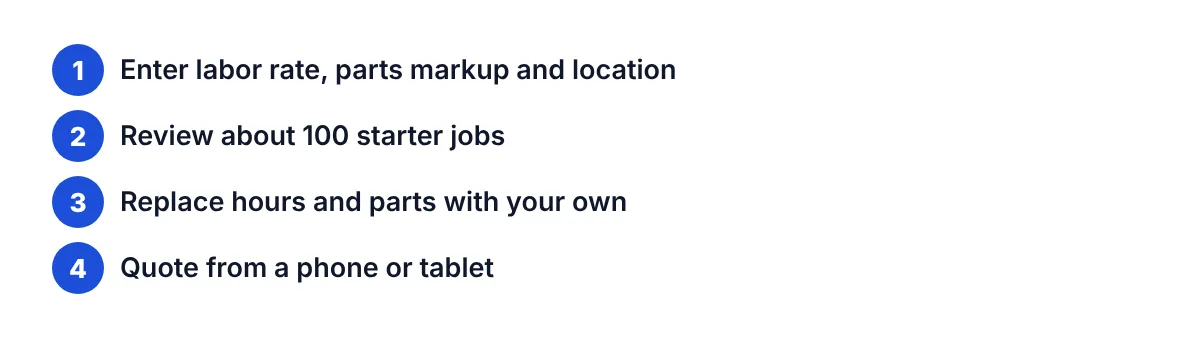
1. Enter your labor rate
A setup wizard will ask for your labor rate, parts markup and location. If you don’t have a rate you trust, you don’t have to wait for the app. The plumber labor rate calculator works it out today from wages, burden, billable hours and overhead.
2. Review the starter jobs
The app will load about 100 common plumbing jobs with suggested hours, priced from your rate. No working plumber has checked those starter hours yet, so don’t take them as gospel. Treat them as a place to start.
3. Replace hours and parts with your own
You’ll be able to edit every item. An item stays labeled Starter until you change it, and then it’s labeled Yours. Each price will show its margin in green, amber or red, so a thin one is easy to spot.
4. Quote and share
From there, your prices will be ready to quote from a phone or tablet. The plumbing quote software page walks through that flow at the door.
Planned Version 1 features
Version 1 is planned around the problems small shops report: bloated books, stale parts costs, and prices locked inside one platform. None of these features is live yet.
A short starter list
Vendor books can run large. One ServiceTitan Community user reported deleting 23,000 unused Profit Rhino elements in May 2022. FlatPriced will start with about 100 jobs, and from there you add what you actually sell.
Repricing with preview and undo
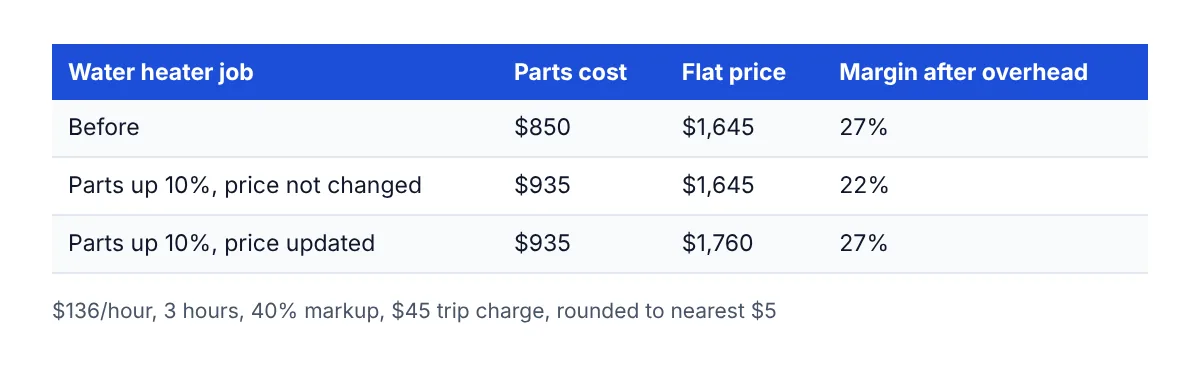
You’ll be able to reprice by material, category or the whole book, by % or $, with a preview, undo and history. Supplier increases are regular: PM Magazine’s April 2026 roundup listed 10% on Charlotte Pipe PVC and CPVC. Do the math on the example water heater: parts go up 10%, the price stays put, and you’ve lost 5 points of margin.
Housecall Pro has a price adjuster, and its help article, dated 20 Aug 2026, says a confirmed increase can’t be undone and that the tool works on services not flat-rate calculated.
Good, Better, Best on every plan
Three-option quotes will be on every plan, including Free. Housecall Pro lists its Sales Proposal Tool on the Max plan as of 3 Nov 2026. The Good, Better, Best guide covers how to set the options.
All-in prices by default
Prices will include the trip charge by default, so the homeowner sees one number. California and Minnesota are among the states with total-price rules, and the state fee law guide sets them out as general information, not legal advice. Confirm your state’s rules with a lawyer.
A public price page
Solo and Shop plans will include a public page of your prices. The closest survey data we found is about HVAC: ACHR News reported on 10 Dec 2024 that 70% of customers surveyed said they’d be more likely to call a company that shows prices, and 31% of contractors showed them.
Export and CSV files
Export to CSV, Excel and PDF will be on every plan, along with CSV files for Jobber, Housecall Pro and QuickBooks. To be clear, these are file exports with no live integration. Housecall Pro’s Profit Rhino guide, dated 6 Aug 2026, says data can’t be exported from those books, though its standard Price Book exports to CSV.
Offline use and AI import
FlatPriced is planned as an installable web app that works offline, so a basement with no signal shouldn’t hold up a quote. AI import will read a photo or PDF of an old price sheet, and you’ll review the result before saving.
Version 1 won’t include scheduling, dispatch, a CRM or an AI receptionist.
Flat rate pricing software vs a paper book vs a spreadsheet
Flat rate pricing software wins on repricing and quoting from the field, while paper and spreadsheets win on cost and simplicity.
| Paper book | Spreadsheet | Price book software | |
|---|---|---|---|
| Cost | Printing | Free or low | Monthly fee, or a free tier |
| Change every price | Reprint | Formula, one person at a time | Bulk update |
| Use at the door | Flip pages | Awkward on a phone | Built for phone or tablet |
| Same price for every tech | If everyone has the latest copy | If everyone has the latest file | Yes, from one book |
| Works with no signal | Yes | If saved on the device | Depends on the app |
| Risk | Old copies in trucks | Broken formulas | Monthly bill, vendor lock-in |
What flat rate software costs
Disclosure: We make FlatPriced, a competing product that is still in pre-launch. Facts about other products come from the sources listed at the end of this page. Prices change, so confirm them with the vendor.
Flat rate software runs from free tiers up to per-tech plans that start at $99 a month, and setup fees or content charges can add more. Figures below are as listed on 3 Nov 2026 and change often.
| Tool | Listed price | Extras listed | Content |
|---|---|---|---|
| FlatPriced (planned founding prices) | Free $0; Solo $39 a month; Shop $69 a month, up to 5 users | No setup fee, no contract | About 100 starter jobs, hours not yet checked by a tradesperson |
| Aptora Flat Rate Plus | Forever Free; Premium Plus $50 a month or $420 a year per user | Export & Print $10 a month, QuickBooks Online sync $100 a month | Prebuilt Plumbing book $1,800 one time, non-refundable |
| Profit Rhino | $39, $49, $59 per tech a month on the overview; subpages show $35, $45, $55 | Coaching and implementation marked required; subpages show $299, $699, $1,499 | Vendor claims 90% of common repairs and quarterly updates |
| The New Flat Rate | Starts at $99 a month per tech, varies by trades and support | Contract terms not found | Built-in 5-option menus |
| ServiceTitan Pricebook Pro | Not published; subscription required | Sits on ServiceTitan | Costs, images, descriptions and sold hours auto-updated |
Let’s be fair here: these products are stronger than FlatPriced in clear ways. They exist today, and FlatPriced doesn’t. Profit Rhino and ServiceTitan offer maintained content that FlatPriced won’t have at launch. If you run a large shop already on ServiceTitan, stay there. And FlatPriced isn’t built for new-construction takeoff.
The full side-by-side is in the flat rate software roundup, and every plan detail is on the pricing page.
FAQs
How much does plumbing flat rate software cost?
Listed prices on 3 Nov 2026 run from free tiers to The New Flat Rate’s starting price of $99 a month per tech. Aptora Premium Plus is $50 a month per user, and Profit Rhino lists $39 to $59 per tech plus required coaching. FlatPriced plans $0, $39 and $69 a month per shop, as founding prices that may change.
Is there free flat rate software for plumbers?
Yes. Aptora’s pricing page, modified 6 Oct 2026, lists a Forever Free plan with 5,000 task items and unlimited book titles, though an older Aptora page shows lower limits. FlatPriced plans a Free plan with 1 user, up to 25 price book items and 3 quotes a month. FlatPriced isn’t live yet, but the free calculators on this site work today.
Can I use my own prices?
Yes, that’s the design. FlatPriced will price every starter job from your own labor rate and markup, and you’ll be able to edit every hour, part and price. You’ll also be able to make a one-off edit on a single job. Items you change will be labeled Yours, so you can see which prices still rest on starter figures.
Do I need ServiceTitan or Jobber to use FlatPriced?
No. FlatPriced is planned as a standalone pricing and quoting tool, so it won’t need a field service platform. If you already run Jobber, Housecall Pro or QuickBooks, the plan is to export your book as a CSV for those systems. It won’t replace them, because Version 1 has no scheduling, dispatch or CRM.
Does FlatPriced work in Canada?
FlatPriced is being built for US shops first. The planned formula runs on the numbers you enter, so nothing in the math is tied to the US. Canadian currency and sales tax handling aren’t on the Version 1 feature list, so a Canadian shop should email [email protected] before counting on it for live quotes.
Are the starter hours accurate?
The starter hours are unproven. No working plumber has checked them yet, and published times for the same job often disagree. Plan to replace them with your own job history. Your dispatch records and invoices know your trucks and your techs better than any suggested figure in a starter list.
Sources
- Plumber Magazine, Confessions of a flat rate pricing convert, 2 Jul 2018
- ServiceTitan Community, Pricebook Pro thread, May 2022
- PM Magazine, PHCP and PVF price increases, April 2026, 2 Apr 2026
- Housecall Pro help, service price adjuster tool, 20 Aug 2026
- Housecall Pro help, Profit Rhino guide, 6 Aug 2026
- Housecall Pro help, Price Book import or export, 2 Jul 2026
- Housecall Pro pricing, seen 3 Nov 2026
- ACHR News, HVAC customers and contractors at odds with online pricing, 10 Dec 2024
- California Attorney General, SB 478 FAQ, seen 3 Nov 2026
- Minnesota Attorney General, price transparency FAQ, seen 3 Nov 2026
- Aptora Flat Rate Plus pricing, modified 6 Oct 2026
- Aptora Flat Rate Plus subscriptions, seen 3 Nov 2026
- Older Aptora Flat Rate Plus page, modified 13 Dec 2024
- Profit Rhino SmartPrice pricing, seen 3 Nov 2026
- Profit Rhino homepage, seen 3 Nov 2026
- The New Flat Rate homepage, seen 3 Nov 2026
- ServiceTitan Pricebook Pro help, updated 16 Oct 2026
- ServiceTitan Pricebook Pro features, seen 3 Nov 2026