
Plumbing quote software for service and repair work
Plumbing quote software lets a service plumber price a job at the house, show the options and get approval before work starts. FlatPriced is being built for that quote at the door, when the homeowner is standing right there and wants a number. It’s planned to work from your own price book. It isn’t a takeoff tool for new-construction bids from plans.
Status, November 2026: FlatPriced is in pre-launch and taking founding customers. The app described here is being built, so features and prices may change before release. The free calculators work today.
Use the free calculator | Join the founding list
Service quotes vs construction takeoff software
Service quoting software prices a known job in front of a customer, while construction takeoff software measures pipe and fittings from plans for a bid. Both get called plumbing estimating software, and search results mix them up. The service kind also goes by plumbers quoting software, a plumbing quote app, a plumbing pricing app or a mobile sales tool.
| Service and repair quote | Construction takeoff and bid | |
|---|---|---|
| Starts from | A problem at the house | A set of plans |
| Price comes from | A stored price for the job | Measured quantities and labor units |
| Who builds it | The tech on site | Usually an estimator |
| Customer sees | A total, often with options | A bid document |
| Where it’s used | Phone or tablet | Usually a desktop |
| FlatPriced | Yes, this is the plan | No, not planned |
If you bid new construction, FlatPriced won’t fit, and we’d rather tell you now. The rest of this page is about service work.
What to look for in a plumbing estimator app
A good plumbing estimator app for service work keeps the price ready before the tech arrives, so the only math at the door is choosing the right job. The checks below separate a quoting tool from a calculator with a logo on it.
| Check | Why it matters at the door | FlatPriced plan |
|---|---|---|
| Stored prices | Same job, same price, any tech | Price book of your jobs |
| Works with poor signal | Basements and crawl spaces | Offline use as an installable web app |
| Options on one screen | Customer picks without a lecture | Present mode with three option cards |
| Second job on the visit | Two full prices can look like gouging | Add-on price for a second job |
| Margin visible | Discounts stay above your floor | Green, amber or red on every price |
| PDF matches the screen | No argument later | PDF and customer link that match |
| Approval in one place | Fewer lost signatures | Approve, sign and deposit in one step |
How a quote will work in FlatPriced
A FlatPriced quote is planned as six steps on a phone or tablet, starting from a price you set in advance. None of this is live yet. You can try the pricing itself today in the free calculator.

1. Pick the job
You’ll search your book for the job, such as “replace angle stop” or “40-gallon gas water heater”. The price will come from your labor rate, parts and markup, so there’s nothing to work out on the doorstep. To set up those prices, start with the plumbing price book page.
2. Build the options
Good, Better and Best options will be available on every plan, including Free. The example below shows how a menu might read. Not sure what goes in each option? Start with the Good, Better, Best guide.
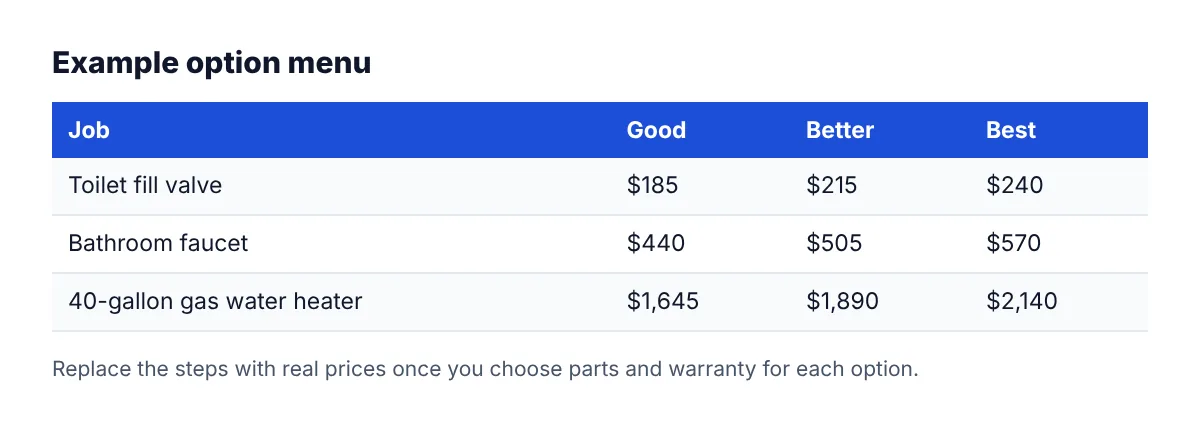
3. Add a second job
Say you’re already at the house and the customer asks about a dripping hose bibb. Customers often do. FlatPriced will carry an add-on price for a second job on the same visit, so you aren’t pricing it like a separate trip. The guide to pricing several jobs on one visit sets out the math.
4. Check the margin
Each price will show its margin in green, amber or red. And when the job throws you something the book didn’t plan for, such as a seized shut-off, you’ll be able to make a one-off price edit for that job without touching the book.
5. Show the customer
Present mode will put three option cards on the screen for the customer to look over. Prices will be all-in by default, so the trip charge sits inside the number on the card.
6. Approve, sign and pay a deposit
The customer will be able to approve, sign and pay a deposit in one step. The PDF and the customer link will match, so a spouse who wasn’t home sees the same quote you showed at the door.
How FlatPriced compares with other plumbing quote apps
Disclosure: We make FlatPriced, a competing product that is still in pre-launch. Facts about other products come from the sources listed at the end of this page. Prices change, so confirm them with the vendor.
Plumbing quote apps differ mostly in which plan includes options and how much of a field service platform comes with them. As listed on 3 Nov 2026, the tools below all offer some form of quoting, and each one is live today, which FlatPriced isn’t.
| Tool | Option quotes | Plan and listed price |
|---|---|---|
| FlatPriced (planned) | Good, Better, Best on every plan | Free $0 (3 quotes a month); Solo $39 and Shop $69 a month, founding prices that may change |
| Housecall Pro | Sales Proposal Tool offers good, better, best | Max: $299 a month billed annually, $329 monthly |
| Jobber | Quote Options: beta, on Jobber.com only. Optional line items on Grow and Plus | Grow, 1 user: $199 monthly, $149 billed annually |
| QuoteIQ | Option quotes not confirmed in our sources. Price Book on every plan | Essentials: $29.99 a month, 1 user |
| The New Flat Rate | Built-in 5-option menus | Starts at $99 a month per tech |
| Aptora Flat Rate Plus | Advertises Good/Better/Best pricing | Forever Free, or Premium Plus $50 a month per user |
Jobber’s help article says the PDF shows only the option the client selected, as a regular line. Housecall Pro and Jobber also run the rest of the business, with scheduling and dispatch that FlatPriced won’t have in Version 1. If you want one system for everything, you may be better served by them. FlatPriced is planned for shops that want the pricing and quoting piece, and it will export a CSV for Jobber, Housecall Pro and QuickBooks.
The wider roundup is in the flat rate software comparison. Full plan details are on the pricing page.
FAQs
What software helps plumbers quote jobs faster?
Software with stored prices helps most, because the tech picks a job instead of working out hours, parts and markup at the house. So look for quoting on a phone, options on one screen and customer approval in the app. Housecall Pro and Jobber do this inside larger platforms. FlatPriced is being built as a smaller pricing and quoting tool.
What is the best app for getting plumbing estimates?
The right app depends on the work. For service and repair, choose a quoting app built on a price book. For new construction, choose a takeoff tool that reads plans. Compare options, plan cost and export first. FlatPriced is pre-launch, so you can’t pick it today, but our free calculator gives you a flat price right now.
Is FlatPriced a plumbing estimating tool for new construction?
No. FlatPriced is being built for residential service and repair quotes, and takeoff from plans isn’t planned for Version 1. A shop that mostly bids new construction needs a tool that measures from drawings. If you do some service work alongside construction, FlatPriced could still cover the service side once it launches.
Will quotes work with no cell signal?
That’s the plan. FlatPriced is being built as an installable web app with offline use, so a tech in a basement can still open the book and build a quote. Offline use is a planned Version 1 feature and hasn’t been tested in the field yet, because the app isn’t live as of November 2026.
Will FlatPriced work with Jobber or Housecall Pro?
FlatPriced is planned to export your book as a CSV file for Jobber, Housecall Pro and QuickBooks. That’s a file you import, so changes won’t sync on their own. Version 1 won’t do scheduling or dispatch, so a shop can keep using those platforms for that work and use FlatPriced for pricing.
Sources
- Housecall Pro pricing, seen 3 Nov 2026
- Housecall Pro Sales Proposal Tool, seen 3 Nov 2026
- Jobber pricing, modified 23 Sep 2026
- Jobber help, Quote Options beta, undated, seen 3 Nov 2026
- QuoteIQ pricing plans 2026, seen 3 Nov 2026
- The New Flat Rate homepage, seen 3 Nov 2026
- Aptora Flat Rate Plus for plumbers, seen 3 Nov 2026
- Aptora Flat Rate Plus pricing, modified 6 Oct 2026